
Complete this guide: https://help.github.com/articles/generating-ssh-keys/
Steps 4 and 5 are especially crucial. For step 5 use the command:
ssh -T git@github.build.ge.com
Once this is completed, we're ready to configure your Bamboo plan! Follow these configurations:
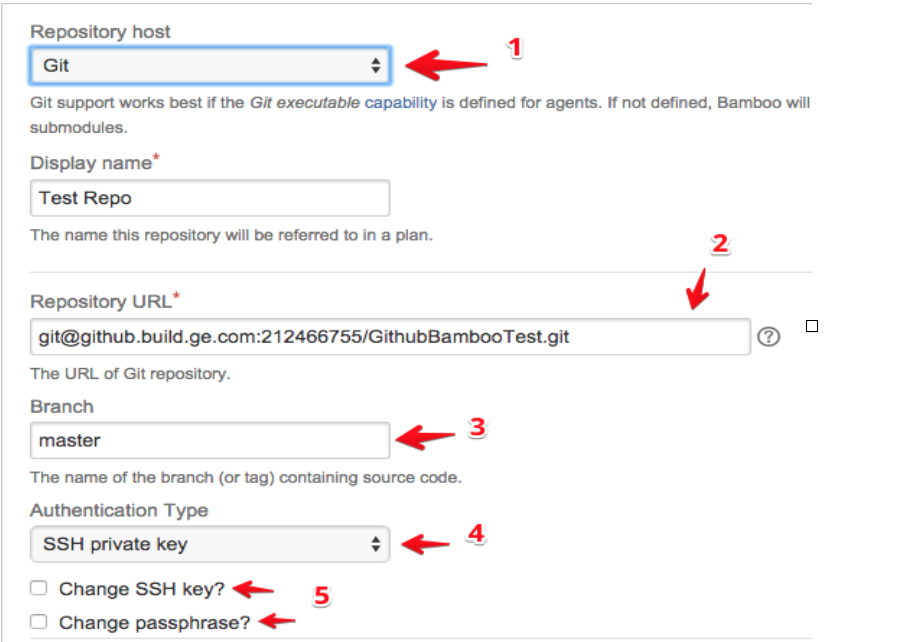
- Make sure to set your repository as GIT
- Set your repository path as specified by GitHub. Usually it will be git@github.build.ge.com:(Project/Username)/.git
- Specify your branch
- Set your authentication to your SSH private key
- Make sure to upload the correct key
- In the terminal, run this command: pbcopy < ~/.ssh/id_rsa
- Attach the private key txt file.
- DO NOT SHARE THIS FILE. This is equivalent to sharing passwords, which is not allowed by GE security policy.
- Paste this into a Word document and save it as a .txt file
- This command is your private key. SSH keys are pairings for encrypting and decrypting.
- Enter your passphrase that you created with the keys
- You're all set to start building! The repo itself can be public or private, as long as the SSH key isn't removed from the Github Repo.
Comments
0 comments
Please sign in to leave a comment.